Meine Namensspardose
Printing and assembly guide
How your file becomes a name money box: open it, assign the colours, print, fit the lock. The same for every name and both fonts.
What is in your file
You choose the format in the designer before you generate the file:
- 3MF for Bambu Studio and OrcaSlicer: the body and the letter faces (the accent) are two parts with the two colours from the designer already assigned. Lock and key are not in the 3MF – download them once separately (links in the designer, below “Download file”).
- STL package (ZIP) for all other slicers:
NAME_koerper.stlandNAME_akzent.stl– plusschloss.stlandschluessel.stl.
The money box itself is one piece: coin slot on top, a round opening for the lock at the back. Lock and key are the same for every name and included free – print them once and reuse them for every further box.
What you need
- a 3D printer whose print bed fits the box (see step 2)
- filament in two colours – one for the body, one for the letter faces at the front. With a multi-colour system (e.g. AMS) the box prints in one go; it also works without one (step 3).
- the files for the lock and the key (linked in the designer, already in the STL package)
1 Open the file in your slicer
- Download the file in the designer – or open it with “Open directly in Bambu Studio / OrcaSlicer”. All your files are also kept under My account.
- 3MF: open it in Bambu Studio or OrcaSlicer. Both colours are preassigned.
- STL package: unzip it and load
NAME_koerper.stlandNAME_akzent.stlinto your slicer. - The box prints lying on its back, the letter side facing up – that is how the file is oriented. You do not need to rotate it.
2 Check the print bed
The box is printed in one piece, so it has to fit on the print bed as a whole. The width depends on the name: roughly 38 to 42 mm per letter.
| Letters | Width |
|---|---|
| 5 | about 190 mm |
| 8 | about 330 mm |
| 15 | about 530 mm |
- Depth: 41 mm. Height: about 64 mm in the “Rounded” font, about 58 mm in “Angular”.
- A 256 mm print bed fits about 6 letters. Longer names need a larger bed.
- The designer shows the exact dimensions of your name before you generate the file and warns you when space gets tight.
- No suitable printer? You can also order the box ready printed (delivery within Germany only).
3 Assign two colours
The body and the letter faces at the front (accent) are separate parts so that each gets its own filament. The letter faces are a thin layer, about 1 mm.
- With AMS or another multi-colour system: in the 3MF the colours are already set. Check which filaments are loaded in your slots and assign the right ones to the body and the accent. With the STL package, give each of the two parts a filament.
- Without a multi-colour system: this is possible – print with a manual filament change between body and accent.
4 Settings and printing
Our recommendation, the same as in our Cults3D listings of this box:
- Layer height: 0.2 mm
- Wall loops: 2
- Infill: 15 to 25 %
- Top and bottom layers: 4
- Supports: none – the box prints without supports in the supplied orientation.
Then slice, print, let it cool down and remove it from the plate.
5 Print the lock and key and fit the lock
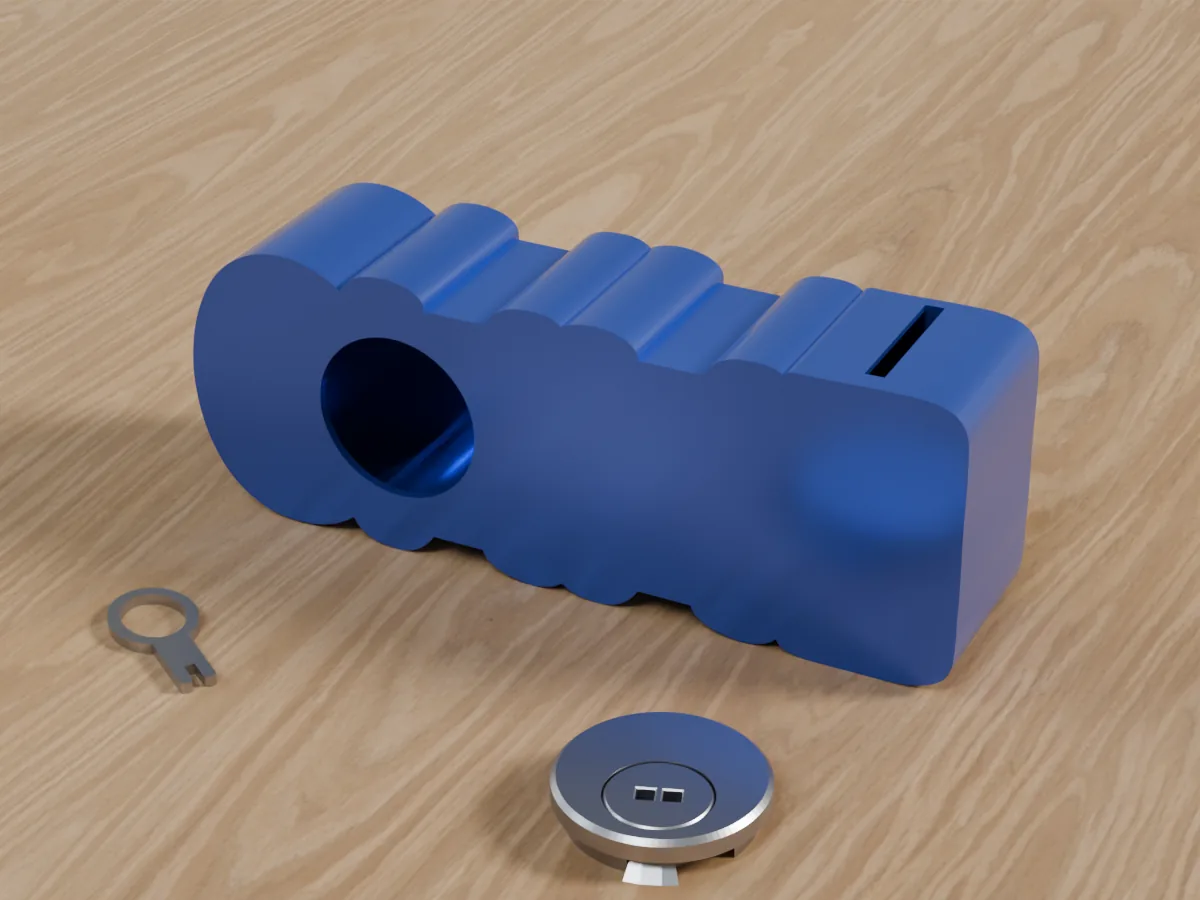
- Download schloss.stl and schluessel.stl (the STL package already contains both) and print them. The lock is about 40 × 40 mm and 9 mm high, the key about 36.5 × 18 mm and 2.4 mm thick.
- At the back of the box there is a round opening about 36 mm in diameter. This is where the lock goes.
- Before you start saving, check that the lock opens and closes with the key.
6 Saving and opening the money box
- The coin slot is on top, 33 mm long – designed for common coins up to the size of a 5 Swiss franc piece.
- To empty the box, open the lock at the back with the key.
Good to know
Files
- Once generated, you get the same name in the same font in any colour and in both formats – without paying again.
- Your files stay in your account and can be downloaded again at any time.
Lock and key
- Both are the same for every name – print them once and reuse them for every further box.
Questions? meinenamensspardose.de/en/#kontakt · info@datrax.de